Showing posts with label facebook tricks. Show all posts

Hack Facebook Private profile Pictures

A long time back i made a post on How to view private Facebook profile picture  but after some time Facebook patched the velnurability and the hack was no longer working.I have just found another hack to view private Facebook profile which i would be sharing in this article.


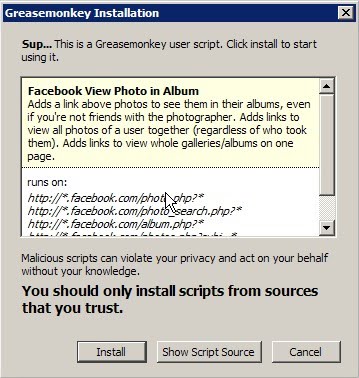
This hack will add a link above such photos with a link saying “See this Photo in its Album”. Clicking this link will reload the photo, but you’ll be viewing it inside the album that you couldn’t view without this hack.
When you are viewing photos in an album the Greasmonkey script will add  an option "Back to the album" This will remove the photo from the page and load a thumbnail gallery of all photos in the album

Requirements:

1.Greasmonkey addon for firefox ( DOWNLOAD LINK )
2.Facebook profile viewing script ( LINK )

Procedure:

1.First of all download Greasmonkey addon  and restart firefox
2.Install the Facebook profile viewing script


3.Click install and restart firefox and you are done.

brought to you by Satz

10x for reading, hope this thread helped you
READMORE
 

Verify Two Facebook Account With The Same Number

I Am Verify My Two Facebook Account  With The Same Number......


If u want verify your 2 a/c with same number follow simple steps


1--- >  Open ur 1st  account and deactive this

2---> logout 1st  account

3---> open ur 2nd account

4--->  go to setting 


5-- Click Mobile Teb  and type ur number

6---   After some time u get code


7--  enter code and save setting

8---> logout your 2nd id and reactive ur first id

 Coung...

Your 1st and 2nd  account runing with same mobile number
READMORE


New ! Interesting thing which i am going to described you in my new Post .. How to Update FB Status Via Any Device - Prank yours friends. Ever wished to pranks your friend using Facebook ? here is a really interesting and funny way. You update your Facebook status via Any device without having it and your friends will think you have got a new gadget. Such as displaying "via Blackberry, via iPhone etc" under your Facebook status. Whenever you will update your status, Facebook detects your device and show it under your status. I have a got a trick you can fool Facebook and your Friends by showing any device name.


See this Example  :


READMORE
 

Get A Free Real Facebook Like , Subscriber, Commenters On Your Page And Profile


Facebook Auto Like Lab


Hello All My Friends Today m give A new Trick How to Get Free Real Facebook Likes, Photo likes, Comment likes  Posts and Status. Get Fastest Delivery of Facebook Likes From Active FB Accounts from your Targeted Audience. Increase your Social Presence for Free.Easiest way of Getting maximum number likes on facebook page, post and status likes , All Facebook likes are real Human, No Risk on your FB Account


Follow Simple Steps And Get


1:- Go To Facebook Auto Like Lab

2 :- Click To Connent Button

3 :-  then Click To subscribe Buttons To Get 3000+ likes

4 :- Click to Share button And Fill The box Means put your Profile Adress in the Box  And click to sumbit button

And See magic 5- 10 days your Profile And page populer in the facebook ..
m also use this trick. and its working fine  if u like this tricks click to share button And like our facebook page
READMORE
 

See Hidden Facebook Pictures

Follow these steps :-

1. Go to the Profile-page of the Person.
2. Clear your Address line
3. Copy this into:

javascript:(function(){CSS.removeClass(document.body,%20'profile_two_columns');tab_controller.changePage("photos");})()


4. Now you can easily see Pictures of s.b. you don't even know.


READMORE
 

6 Tips to Avoid Facebook Viruses and Spam Messages

Facebook, the biggest social network with 500 million users, provides an interface to hit an unsuspecting crowd with malware and viruses. These viruses aren’t very difficult to detect  if you are cautious enough. These Facebook viruses appear on your wall in forms of a bizarre or eye-catching stories and videos and once the user has clicked/liked the link, it is already late. The next step will be getting rid of your Facebook virus which is a time-consuming  process.  Its better to avoid spam messages and trojan viruses in the first place.

How to avoid it?

1. Think before you Act. Viruses on Facebook are sneaky. The hackers and cybercriminals who want your information know that Facebook users will often click on an interesting post without a moment’s thought. If a post sounds a bit over-the-top like a headline out of a tabloid, this is your first warning sign.
2. Try to avoid Links and videos with Catchy words like  “funniest ever,” “most hilarious video on Facebook,” or “you’ve got to see this.” Do some keyword research to see if the post in question comes up in a search engine with information about a current virus or trojan.
3. Check the poster of the Suspicious content. If you receive a message from someone you do not know, this is an obvious red flag. Facebook video viruses also tend to pop up in your news feed or on your wall from friends you haven’t talked to in a while. Unfortunately, it’s likely this friend has already fallen victim to the latest virus on Facebook. After clicking on the story themselves, the message was sent out to all of their friends as well.
4 Avoid messages that have been posted by multiple users as the virus spreads among your friends who were not so cautious. If a link with title such as “Sexiest video ever” shows up all over your feed from all kinds of people (perhaps friends you would not expect to make such a post), this is another warning sign. Similar direct messages are a likely variant of the notorious Facebook Koobface virus which has used this approach in the past.
5. Do not fall for the “typical” money-transfer schemes. Chat messages from friends needing funds will usually sound suspicious. Everything can’t be screened before posting, so money transfer scams and hoax applications still find their way on to Facebook. You should also avoid applications that claim to do a full “Error check” or fix security problems related to your profile.
6. Update your anti-virus software frequently. If you do accidentally click on a post before realizing it is a hoax, do not click on any further links or downloads. If it’s too late and you have already been infected, the Facebook virus removal process may be effortless if you have a good anti-virus program to catch the virus, trojan or other malware early on.
READMORE